
NCVIEW2D: Difference between revisions
From BAWiki
Günther Lang (talk | contribs) working group POS |
m Link zu boewrt.dat |
||
| (3 intermediate revisions by the same user not shown) | |||
| Line 2: | Line 2: | ||
|name_de=NCVIEW2D | |name_de=NCVIEW2D | ||
|name=NCVIEW2D | |name=NCVIEW2D | ||
|version= | |version=September 2021 | ||
|version_descr=September 2022 | |version_descr=September 2022 | ||
|catchwords= | |catchwords=post processor<br /> | ||
time series<br /> | time series<br /> | ||
[[CF-NETCDF.NC|cf-netcdf.nc]] | [[CF-NETCDF.NC|cf-netcdf.nc]] | ||
|shortdescription= | |shortdescription= | ||
[[NCVIEW2D]] is applied to visualize [[CF-NETCDF.NC|cf-netcdf.nc]] data as time series. The following objects are within a plot: | [[NCVIEW2D]] (see also [https://wiki.baw.de/de/index.php?title=NCVIEW2D.DAT NCVIEW2D.DAT] in German language) is applied to visualize [[CF-NETCDF.NC|cf-netcdf.nc]] data as time series. The following objects are within a plot: | ||
# plot window(s) (also subplots) | # plot window(s) (also subplots) | ||
| Line 32: | Line 32: | ||
|inputfiles= | |inputfiles= | ||
# req: [ | # req: [https://wiki.baw.de/de/index.php?title=NCVIEW2D.DAT NCVIEW2D.DAT] (in German language) | ||
|outputfiles= | |outputfiles= | ||
# [[MATLAB]] figure *.fig | # [[MATLAB]] figure *.fig | ||
# | # DMQS metadata (stored in figure) | ||
# program log *.sdr | # program log *.sdr | ||
# errors and warning *.err | # errors and warning *.err | ||
| Line 43: | Line 43: | ||
|methodology= | |methodology= | ||
This program was written in | This program was written in MATLAB and takes advantage of existing PROGHOME methods, such as unit conversion or i/o of [https://wiki.baw.de/en/index.php/BOEWRT.DAT BOEWRT] data. The program is subdivided in the following sections: | ||
# Reading and checking the steering file | # Reading and checking the steering file | ||
# Testing of the existence of input data and its variables | # Testing of the existence of input data and its variables | ||
# Testing of the plausibility of input parameters | # Testing of the plausibility of input parameters | ||
# Extracting optional parameters, which have been given in [ | # Extracting optional parameters, which have been given in [https://wiki.baw.de/de/index.php?title=NCVIEW2D.DAT NCVIEW2D.DAT], other data is set to a default value. | ||
# Data import (file, variables) | # Data import (file, variables) | ||
# opt: data operations | # opt: data operations | ||
| Line 60: | Line 60: | ||
# Initialising the figure box and grid lines (if requested) | # Initialising the figure box and grid lines (if requested) | ||
# Initialising the textboxes (if requested) | # Initialising the textboxes (if requested) | ||
# Writing | # Writing DMQS information in *.fig | ||
# Export *.fig | # Export *.fig | ||
# opt: export further formats (if requested) | # opt: export further formats (if requested) | ||
| Line 71: | Line 71: | ||
|add_software= keine | |add_software= keine | ||
|contact_original=R. Hagen | |contact_original=R. Hagen | ||
|contact_maintenance=[mailto:pos.proghome@baw.de Working group POS] | |contact_maintenance=D. Reddy, U. Schiller, [mailto:pos.proghome@baw.de Working group POS] | ||
|documentation= | |documentation= | ||
* Template Files: | * Template Files: | ||
** template files available in '''$PROGHOME/examples/ | ** template files available in '''$PROGHOME/examples/ncview2d''' | ||
}} | }} | ||
Latest revision as of 13:44, 16 October 2026
Basic Information
Name of Program
NCVIEW2D
Version-Date
September 2021
Description-Date
September 2022
Catchwords
post processor
time series
cf-netcdf.nc
Short Description of Functionality
NCVIEW2D (see also NCVIEW2D.DAT in German language) is applied to visualize cf-netcdf.nc data as time series. The following objects are within a plot:
- plot window(s) (also subplots)
- y-axis
- data
A plot window can also have two y-axis with 5 individual data sets each. E. g. plot window 1 and its y-axis 1 can contain the measured and modeled water level, while plot window 2 could show measured salinity on the left y-axis and discharge on the right y-axis. Plot windows are placed from north to south. Below the lowes window, the UUID of the cf-netcdf.nc data may be displayed as legend.
-
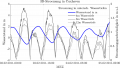 example 1
 -
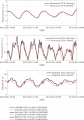 example 2
 -
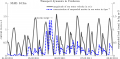 example 3


Input-Files
- req: NCVIEW2D.DAT (in German language)
Output-Files
- MATLAB figure *.fig
- DMQS metadata (stored in figure)
- program log *.sdr
- errors and warning *.err
- opt: plot data stored as spreadsheet or MATLAB Timetable
- opt: other formats such as *.jpg, *.tif, *.svg, *.pdf, *.png
Methodology
This program was written in MATLAB and takes advantage of existing PROGHOME methods, such as unit conversion or i/o of BOEWRT data. The program is subdivided in the following sections:
- Reading and checking the steering file
- Testing of the existence of input data and its variables
- Testing of the plausibility of input parameters
- Extracting optional parameters, which have been given in NCVIEW2D.DAT, other data is set to a default value.
- Data import (file, variables)
- opt: data operations
- opt: data smoothing
- Testing of existence of x-axis limits
- Initialising the figure environment
- Initialising the the axis
- Initialising the the legend
- Initialising the UUID legend (if requested)
- Initialising the figure title (if requested)
- Initialising the figure box and grid lines (if requested)
- Initialising the textboxes (if requested)
- Writing DMQS information in *.fig
- Export *.fig
- opt: export further formats (if requested)
- opt: export of data as spreadsheet (xlsx) or MATLAB Timetable
- controlled end
Program(s) to run before this Program
UNTRIM, UNTRIM2, UNK, DATACONVERT, BOE2NC, NCDELTA, NCANALYSE, NCCUTOUT, Delft3D-Flexible Mesh
Program(s) to run after this Program
Additional Information
Language
MATLAB r2020b
Additional software
keine
Original Version
R. Hagen
Maintenance
D. Reddy, U. Schiller, Working group POS
Documentation/Literature
- Template Files:
- template files available in $PROGHOME/examples/ncview2d
back to Program Descriptions